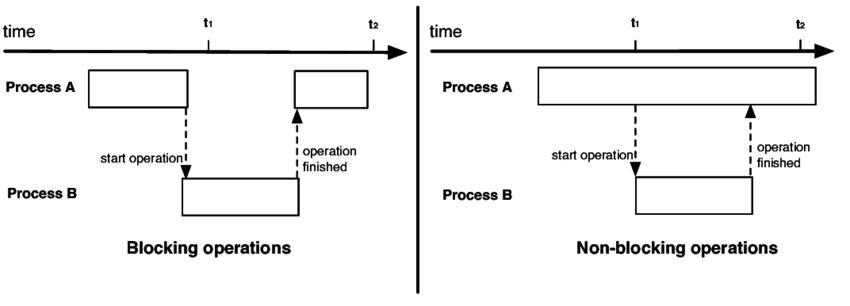
In this lab we'll learn about blocking vs non-blocking operations, the Promises class and its methods, the async and await keywords, then loading data from an OS file into the database.
Because ES6 introduced the async keyword to deal with non-blocking operations, you may think that the async keyword makes a function either "non-blocking" or at least "multi-threated in some way" but neither is true.
To test what blocking and non-blocking really means:
1. Open VSCode at the root of your your workbench project and create a folder named async/
2. Create a filed named snippet-1.js in the async/ folder
Note: A very easy interview question would be "What is the output of this code snippet?"
// Snippet 1

let value = 0;

const printValue = () => console.log(value);
const increaseValue = () => value += 10;

printValue();
increaseValue();
printValue();
3. Run snippet-1.js to check the output
node async/snippet-1.js4. Create a file named snippet-2.js in the async/ folder
Notice the slowedIncreasedValue function is marked as an async function
// Snippet 2

let value = 0;

const printValue = () => console.log(value);

const slowedIncreaseValue = async () => {
    for (let i = 0; i < 10_000_000_000; i++); // waste time with computation
    value += 10;
}

printValue();
slowedIncreaseValue();
printValue();
5. Run snippet-2.js to check the output
node async/snippet-2.jsNotice how much longer it takes for the code to complete. This is a blocking operation despite the async.
6. To simulate an actual non-blocking operation, create, then run snippet-3.js
// Snippet 3

let value = 0;

const printValue = () => console.log(value);
const delayedIncreaseValue = () => {
    setTimeout(() => value += 10, 3000);
}

printValue();
delayedIncreaseValue();
printValue();
You can use the setTimeout function to have something happen "after a given amount of time (3000 milliseconds in this case). "What will happen" (the callback function) is the 1st argument and the is delay the second.
7. Create, then run snippet-4.js and notice the result is the same despite the "async" keyword
// Snippet 4

let value = 0;

const printValue = () => console.log(value);
const delayedIncreaseValue = async () => {
    setTimeout(() => value += 10, 1000);
}

printValue();
delayedIncreaseValue();
printValue();
Which leaves us with 2 important questions:
1) What is non-blocking code?
2) What does async actually do?
To answer 1), remember from Lab 1 that Node.js (and JavaScript in general) is single-threaded, and not ideal for computationally heavy tasks like slowedIncreaseValue in snippet-2.js. This means that actual non-blocking code is something processed or initiated outside of Node.js. Usually this means something handled by the OS level like a file-reading operation, web request or user input: when node is waiting for something from outside.
The answer to answer 2) is that the async function declaration forces the function to return a Promise, even if the function is actually synchronous and blocking. It doesn't make the function "multi-threaded" or "non-blocking". What it does it to provide an interface for operations that are already non-blocking to be written like synchronous code with the use of await keyword and the better try/catch syntax.
Most - but not all - of these operations return a Promise, an object that will you can provide callbacks to be executed when the "waiting is done".
The Promise object represents the eventual completion (or failure) of an asynchronous operation and its resulting value. A Promise is always in one of these states:
pending: initial state, neither fulfilled nor rejected.fulfilled: meaning that the operation was completed successfully.rejected: meaning that the operation failed.
A promise is also said to be settled if it is either fulfilled or rejected, but not pending.
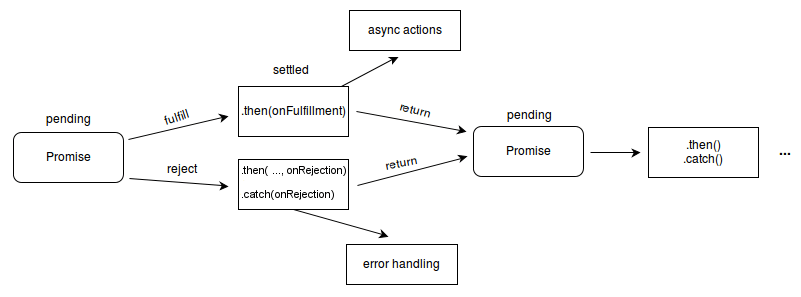
And, as we can see, the function must decide which path the Promise will take by calling either resolve or reject
1. Create and step through snippet-5.js with the debugger
// Snippet 5

function likeAWebRequest(shouldResolve) {
    return new Promise((resolve, reject) => {
        if (shouldResolve) {
            resolve(200);
        }
        else {
            reject(404);
        }
    });
}

let promiseThatWillResolve = likeAWebRequest(true);
let promiseThatWillBeRejected = likeAWebRequest(false);

promiseThatWillResolve
    .then(resolveValue => console.log(resolveValue)) // 200
    .catch(rejectValue => console.error(rejectValue)); // --

promiseThatWillBeRejected
    .then(resolveValue => console.log(resolveValue)) // --
    .catch(rejectValue => console.error(rejectValue)); // 404

console.log(promiseThatWillResolve); // Promise { 200 }
console.log(promiseThatWillBeRejected); // Promise { <rejected> 404 }
The signature of the Promise constructor defines that it's only argument is:
executor
A function to be executed, with two functions as parameters: resolveFunc and rejectFunc
Any errors thrown in the executor will cause the promise to be rejected, and the return value will be neglected.
And it's return value is:
A promise object that becomes resolved when either of the functions resolveFunc or rejectFunc are invoked (or an error is thrown).
To handle these possible states the Promise object has 3 methods.
[!!!] The promise class has only 3 instance methods: then(), catch(), and finally()
The then() method takes up to two callback functions for the fulfilled and rejected cases, and immediately returns another Promise object, allowing you to chain calls to other promise methods. The second argument, the rejected callback, is optional.
The catch() method sets up a function to be called when the promise is rejected or an exception is thrown and immediately returns another Promise object, allowing you to chain calls to other promise methods. It functions as a shortcut for then(undefined, onRejected).
In the following example, the then()'s optional 2nd argument takes priority over the catch()
1. Create and step through snippet-6.js with the debugger
// Snippet 6

function likeAWebRequest(shouldResolve) {
    return new Promise((resolve, reject) => {
        if (shouldResolve) {
            resolve(200);
        }
        else {
            reject(404);
        }
    });
}

let promiseThatWillBeRejected = likeAWebRequest(false);

promiseThatWillBeRejected
    .then(
        // then's first argument
        resolveValue => console.log(resolveValue),
        // thens' second argument
        rejectedValue => console.error(`${rejectedValue} - then() 2nd arg`) // If you comment this the catch will be called
    )
    .catch(
        // catch's only
        // same as then's second argument
        rejectValue => console.error(`${rejectValue} - catch() only arg`)
    );

console.log(promiseThatWillBeRejected); // Promise { <rejected> 404 }
2. Create and step through snippet-7.js with the debugger
Finally, the finally() schedules a function to be called when the promise is settled (either fulfilled or rejected) and also immediately returns another Promise object, allowing you to chain calls to other promise methods.
// Snippet 7
function checkMail() {
    return new Promise((resolve, reject) => {
        if (Math.random() > 0.5) { // Works half the time
            resolve('Mail has arrived');
        } else {
            reject('Failed to arrive');
        }
    });
}

checkMail()
    .then(mail => {
        console.log(mail);
    })
    .catch(err => {
        console.error(err);
    })
    .finally(() => {
        console.log('Experiment completed');
    });
3. Create and step through snippet-8.js with the debugger a few times
// Snippet 8
let URL = "https://global-warming.org/api/ocean-warming-api";
if (Math.random() > 0.5) {
    URL = "http://localhost:0000/bad-url"; // not available
}

fetch(URL)
    .then(result => {
        console.log(`result: ${result}`);
    })
    .catch(error => {
        console.error(`error: ${error}`);
    })
    .finally(() => {
        console.log('This runs either way');
    });
4. Create and run snippet-9.js
Now we can return to our original example of looking for non-blocking execution:
// Snippet #9
let value = 0;

const printValue = () => console.log(value);

// "I promise to do nothing"
const emptyPromise = new Promise(res => res()); // you still need a res defined

// Not to be confused with
const brokenPromise = new Promise(() => { }); // never completes - doesn't work

// All it does is return a brokenPromise
const async0 = () => brokenPromise;

// All it does is return an emptyPromise
const async1 = () => emptyPromise;

// An async anonymous empty function
const async2 = async () => { };

printValue(); // prints 0

async0()
    .then(() => value += 10)
    .finally(() => console.log(`(0) finally print the value: ${value}`)); // never runs

async1()
    .then(() => value += 10)
    .finally(() => console.log(`(1) finally print the value: ${value}`)); // prints 20

async2()
    .then(() => value += 10)
    .finally(() => console.log(`(2) finally print the value: ${value}`)); // prints 20

printValue(); // prints 0 before the any of the finally() trigger[!!!] The the async keyword:
1) Changes the return return type to a Promise<T>
2) Allows the use of the keyword await in the body
The await, replaces the then(), catch(), and finally() methods. It let's us wait for a promise's resolution and can only be used inside either an async function or at the top level of an ESM module.
In plain English: instead of calling then() to resolve the promise, we can avoid having to write a callback and write synchronous-looking code that "only runs" when "it's ready".
Let's see an example using the fetch API and the Response object.
[!!!] Not only is the fetch function asynchronous and returns a promise (i.e. it has to wait for the response from the server) but some methods of the resulting response object are also async because it may take time to process the payload of request like a file download.
1. Create and run snippet-10.js
// Snippet 10
let URL = "https://global-warming.org/api/ocean-warming-api";

console.log('Nested chain - Start'); // Prints 1st

fetch(URL)
    .then(response => response.text()
        .then(text => console.log(text.length))
        .finally(() => console.log(`text()'s finally (nested)`))
    )
    .finally(() => console.log(`fetch()'s finally (chained the nested then)`));

console.log('Nested chain - End'); // Prints 2nd

console.log('Chain without nesting - Start');  // Prints 3rd

fetch(URL)
    .then(response => response.text())
    .then(text => console.log(text.length))
    .finally(() => console.log(`text()'s finally (chained)`))

console.log('Chain without nesting - End');  // Prints 4th

console.log('In sequence using await - Start');  // Prints 5th and before any result
let response = await fetch(URL);
let text = await response.text();
console.log(text.length);
console.log('await result');
console.log('In sequence using await - End'); // Will always be after 'await result'
The sequence of these printing blocks might change, but certain statements will always be right after others.
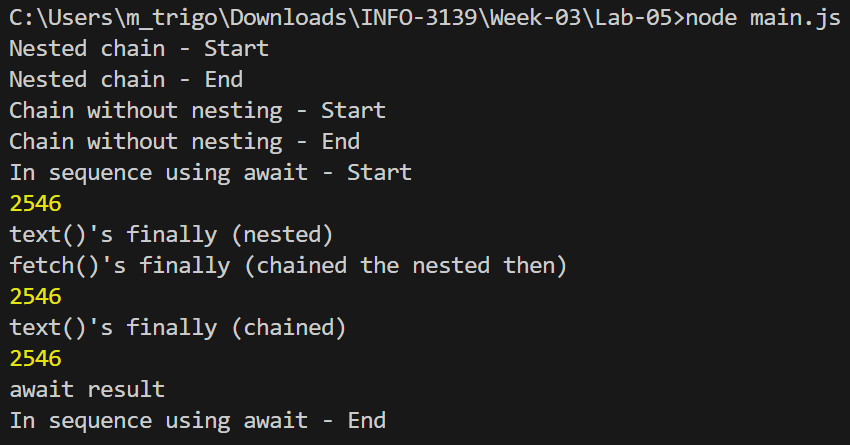
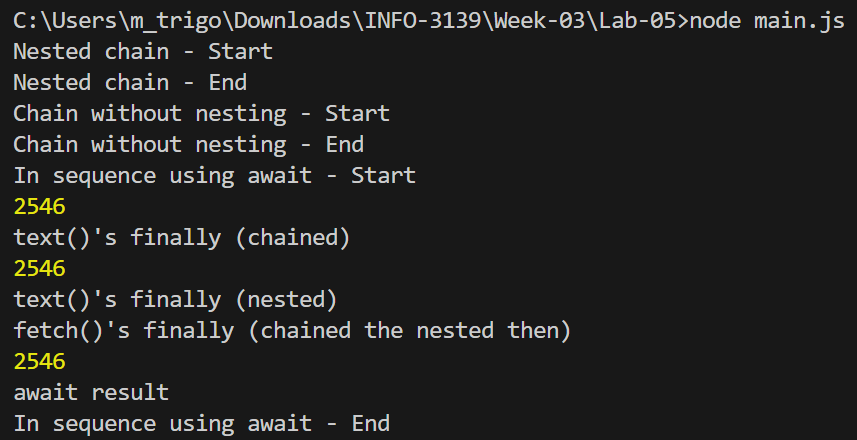
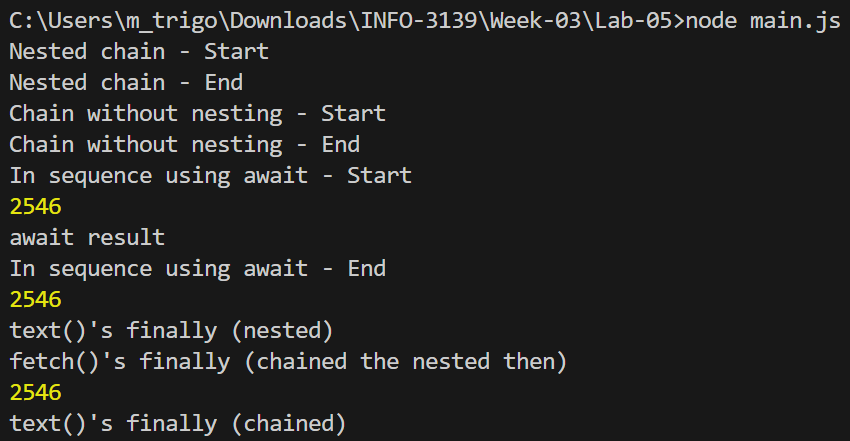
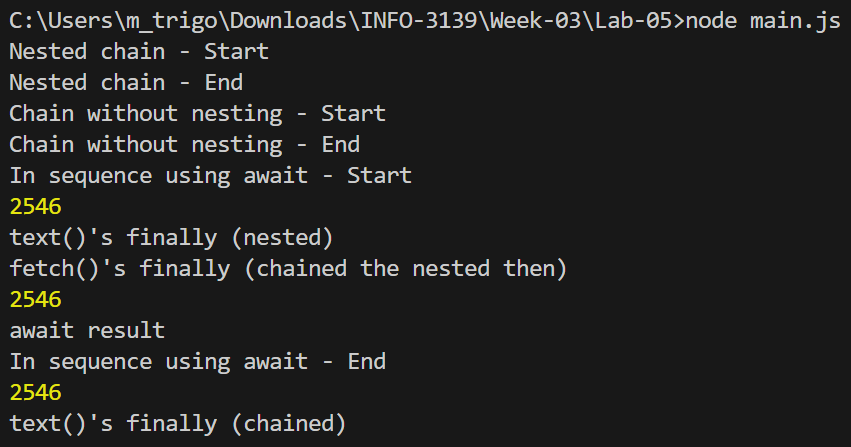
[!!!] So the two big benefits of using await are:
await a response, the async function (or module) will "sleep until..." the response is settled (either resolve or reject) and the statements after the await won't run until after that. Breakpoints to set that logic are easy to settry / catch / finally block instead of the promise methods, which reinforces the previous benefit (i.e. makes it easier to debug, develop, and maintain)2. Create and run snippet-11.js a few times
// Snippet 11
let url = "https://global-warming.org/api/ocean-warming-api";
if (Math.random() > 0.5) {
    console.log("Updated to the bad url");
    url = "http://localhost:0000/bad-url"; // not available 50% of the time
}

try {
    console.log("Before the fetch()");
    let response = await fetch(url);
    console.log("After the fetch() - before the text()");
    let text = await response.text();
    console.log(text.length);
}
catch (error) {
    console.error(`${error}`);
}
finally {
    console.log('done');
}
3. Commit all these files into your Workbench project with the message "Promises and async/await"
To complete Lab 5, we'll need to add a file to our server project that we will read from the OS and write into the database. You can download the file from this link or from this week in FOL content module.
1. Open VSCode at the root of the server project
2. Create a folder named data/ at the root of the server project
3. Add the iso-countries.json to data/
4. Update the .env to include the path to the ISO file
// Other Env Vars...

ISO_FILE_PATH=data/iso-countries.json
5. Update (don't replace) server.js to include the fs import (Line 3) and the code from lines 11 to 18
Note: Next week, we'll review module exporting and importing to abstract the database setup into a module
// Other imports...

import * as fs from "node:fs/promises";

let db = undefined;
try {
    // Initialize the database...
    // Retrieve advisory data with an API web request...
    // Drop then re-create thea database...

    // Read a file from the iso-countries.json file from the OS
    let isoFile = await fs.readFile(process.env.ISO_FILE_PATH);
    let isoText = await isoFile.toString();
    let isoCountries = await JSON.parse(isoText);

    // Write to the database
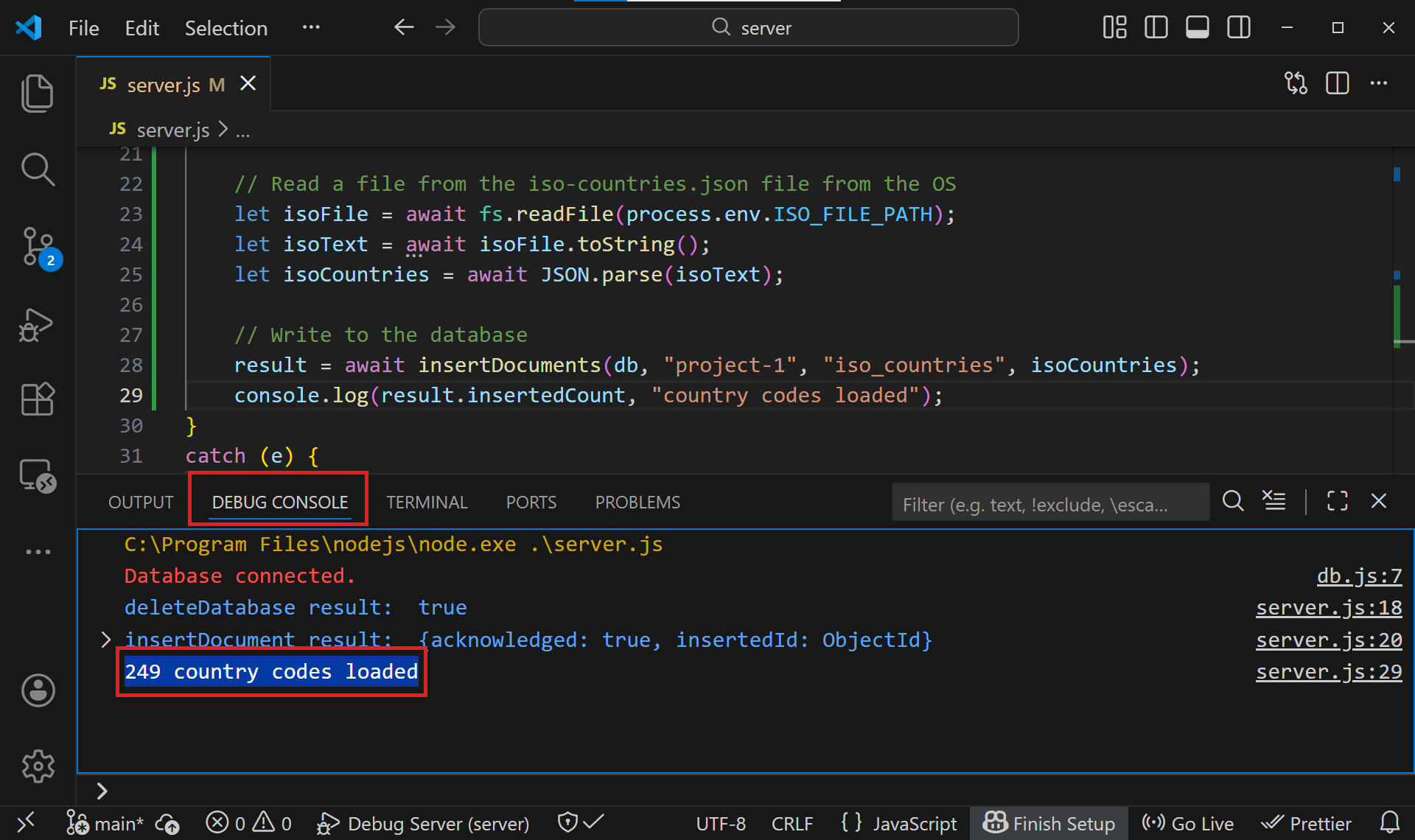
    result = await insertDocuments(db, "project-1", "iso_countries", isoCountries);
    console.log(result.insertedCount, "country codes loaded");
}
catch (e) {
   // ...
}
finally {
   // ...
}
Notice the amount if awaited calls we have and how it allows us to write highly asynchronous code as if it was synchronous.
6. Run the server with the debugger and check the output in the DEBUG TERMINAL
Screenshot 1)
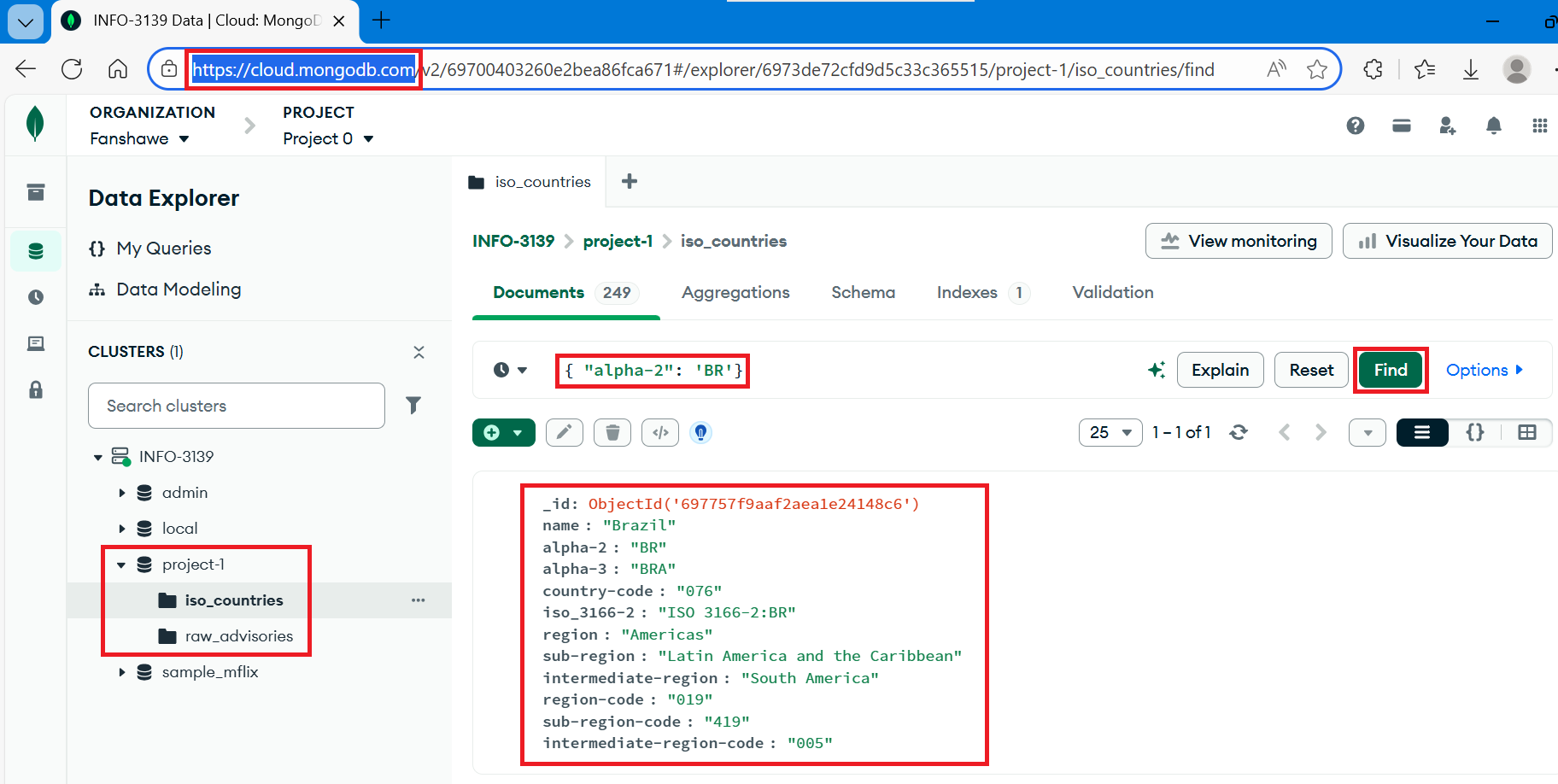
7. Log into the Mongo AtlasDB and search for any country within the iso_countries collection
Screenshot 2)
8. Make a commit for "Lab 5"
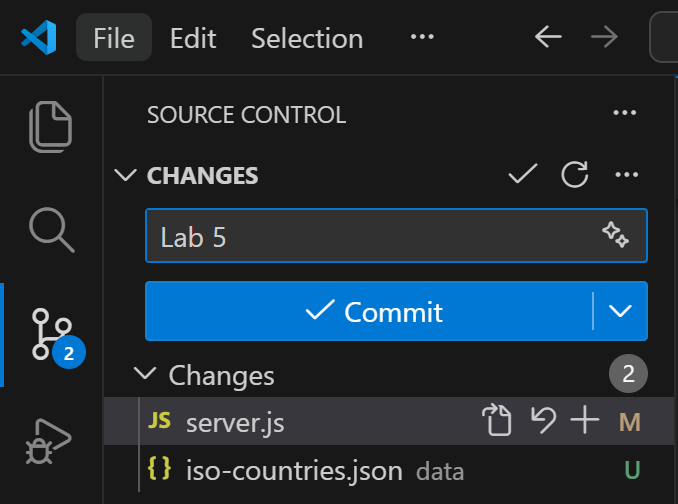
Screenshot 1 from Step 6.6
Screenshot 2 from Step 6.7
https://nodejs.org/en/learn/asynchronous-work/overview-of-blocking-vs-non-blocking
https://developer.mozilla.org/en-US/docs/Web/JavaScript/Reference/Statements/async_function
https://nodejs.org/api/timers.html#settimeoutcallback-delay-args
https://developer.mozilla.org/en-US/docs/Web/JavaScript/Reference/Global_Objects/Promise
https://developer.mozilla.org/en-US/docs/Web/JavaScript/Guide/Using_promises
https://developer.mozilla.org/en-US/docs/Web/JavaScript/Reference/Global_Objects/Promise/all
https://developer.mozilla.org/en-US/docs/Web/JavaScript/Reference/Global_Objects/Promise/then
https://developer.mozilla.org/en-US/docs/Web/JavaScript/Reference/Global_Objects/Promise/catch
https://developer.mozilla.org/en-US/docs/Web/JavaScript/Reference/Global_Objects/Promise/finally
https://developer.mozilla.org/en-US/docs/Web/JavaScript/Reference/Operators/await
https://developer.mozilla.org/en-US/docs/Web/API/Window/fetch
https://developer.mozilla.org/en-US/docs/Web/API/Fetch_API/Using_Fetch
https://developer.mozilla.org/en-US/docs/Web/API/Response
https://nodejs.org/api/modules.html
https://nodejs.org/api/esm.html
https://developer.mozilla.org/en-US/docs/Web/JavaScript/Reference/Statements/export
https://developer.mozilla.org/en-US/docs/Web/JavaScript/Reference/Statements/import